1 Your practice2 Contact3 Calendar

About your practice

Which products are you interested in? Select all that apply
What software does your firm use? Select all that apply
Select your software
Your complete front office, connected to MyTAXPrepOffice

Your CRM andAI Front Desk—in MyTAXPrepOffice.

From Yelp, Thumbtack, and Angi leads to booked appointments and organized tax documents—keep the entire client journey connected. TaxAutomate brings lead follow-up, phone, text, chat, Facebook, and WhatsApp together with kiosk intake, your client mobile app, and MyTAXPrepOffice.

Bring the documents into an organized, bookmarked binder your preparer can review. Keep client conversations, automated reminders, missing-document requests, and staff notes connected—so your team spends less time chasing paperwork and more time preparing returns.

Your team stays in control. Your preparer reviews the source documents and completes the return in MyTAXPrepOffice.

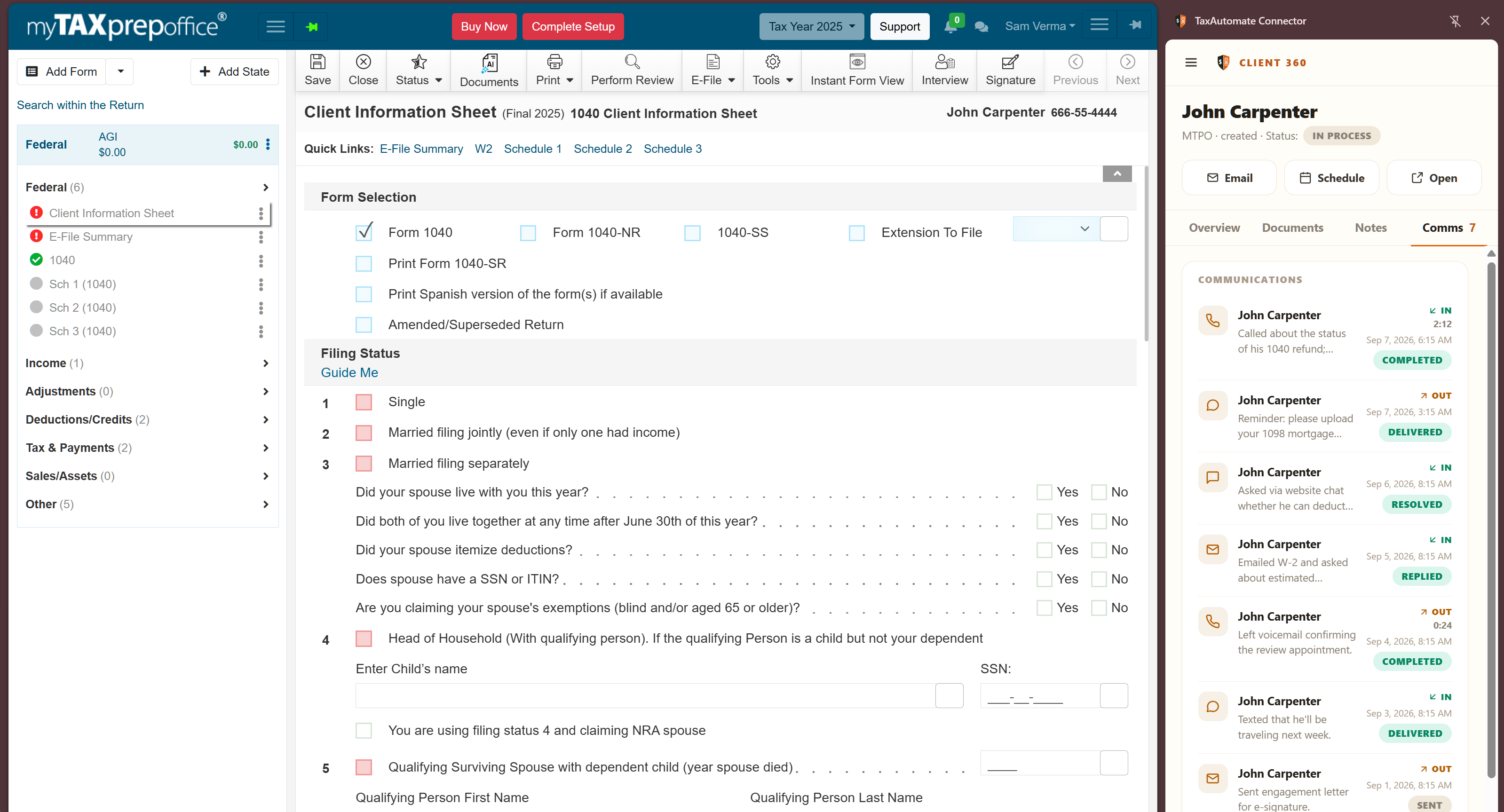
Keep the client beside the return. Open the linked Client 360 record while you work in MyTAXPrepOffice.
Keep the client beside the return.

Open the linked Client 360 record while you work in MyTAXPrepOffice.

SEE THE COMPLETE WORKFLOWFrom first inquiry to a review-ready binder.

Intake, reminders, documents, and your connected client record.

Book a demo →
From first inquiry to a review-ready binder

Win the client. Collect the paperwork. Keep the return moving.

Your tax software prepares the return. TaxAutomate connects the work that gets clients ready: lead capture, appointments, intake, conversations, document organization, and follow-up.

1

Turn more inquiries into clients.

Connect lead sources like Yelp, Thumbtack, Angi, Facebook, and your website to your front-office workflow. AI Front Desk helps answer questions, capture contact details, and guide prospects toward an appointment, while your CRM keeps the relationship moving.

Make the first conversation the start of an organized client relationship.
2

Meet clients wherever they reach you.

Connect phone, text, website chat, Facebook messaging, and WhatsApp through your configured front-office channels. Keep conversations and follow-up with the client so staff can pick up where the last conversation ended.

One team, a shared client history, fewer missed follow-ups.
3

Make intake easy—in the office or on the go.

Welcome walk-ins through your office kiosk. Give remote clients a mobile app and client portal to share information, upload documents, and respond to requests. Bring office visits and digital intake into the same preparation workflow.

Give every client a convenient way to get started and stay involved.
4

Turn scattered documents into an organized binder.

Collect the source documents, organize them into a bookmarked PDF binder, and make them available for your preparer to check. Keep the review connected to the original documents so your team can find the evidence it needs while working in MyTAXPrepOffice.

Spend less time hunting through attachments and more time preparing.
5

Keep missing documents from holding up the return.

Use document checklists and automated reminders to keep collection moving. Let clients know what is still needed through your firm's configured reminder channels, then track replies and arrivals in the client record. Staff can step in when a client needs personal help.

Make the next step clear without repeating the same chase by hand.
6

Bring the whole front office beside preparation.

Open the linked TaxAutomate record alongside MyTAXPrepOffice to review communications, documents, notes, and outstanding requests. Use the organized binder for source review while your preparer handles the tax return and final decisions in MyTAXPrepOffice.

From first inquiry to preparer review, keep the work connected.
Built around your entire client journey

A stronger front office for your MyTAXPrepOffice firm.

Connect the channels clients use with the organized documents and review workflow your preparers need.

What does the complete MyTAXPrepOffice integration include?

TaxAutomate connects the work before and around the return: lead capture, AI Front Desk, CRM, appointments, kiosk intake, mobile app and portal document collection, organized binders, and automated reminders. The connected Client360 panel brings client documents, conversations, notes, and outstanding requests beside your MyTAXPrepOffice workspace.

Do we still get organized binders for preparer review?

Yes. Document collection and binder organization remain central to the workflow. TaxAutomate brings source documents into an organized, bookmarked PDF binder that your preparer can open and check while preparing in MyTAXPrepOffice. Your preparer reviews the source material and remains responsible for the return.

How do phone, text, chat, Facebook, and WhatsApp fit together?

Your firm's connected front-office channels let clients reach you in the way they prefer. AI Front Desk helps handle inquiries and follow-up, while CRM keeps the relationship and conversation history organized. Your team configures the channels, reminder workflows, and points where staff take over; the MyTAXPrepOffice panel brings the linked client record beside preparation.

Can we connect lead sources like Yelp, Thumbtack, and Angi?

Bring inquiries from Yelp, Thumbtack, Angi, Facebook, and your website into your configured front-office workflow. Route inquiries into your configured front-office workflow, capture contact information, follow up, and guide prospects toward an appointment or client intake. Carry the relationship forward in CRM as the prospect becomes a preparation client.

How do the kiosk and mobile app help collect documents?

The office kiosk supports in-person intake, while the client mobile app and portal give clients a way to provide information and documents remotely. Bring those submissions into the client record and document workflow, then organize the material for preparer review.

Can we automate missing-document reminders?

Yes. Set up reminders around your collection workflow so clients know what is outstanding and what to do next. Use your firm's configured reminder channels and track incoming documents and replies. The connected panel also provides a direct email-request action for needed documents.

Where does tax preparation happen?

Your team continues preparing the return in MyTAXPrepOffice. TaxAutomate handles the connected front-office and document workflow, making the client record and organized source material available for review. Your preparer controls tax decisions, final review, and filing.
See your complete front office in action

See how much chasing your firm can leave behind.

Walk through a client journey from a new inquiry to an organized binder beside MyTAXPrepOffice. See how intake, your mobile app, communications, and automated reminders work together to get clients ready for preparation.

Capture leads and book appointmentsCollect through kiosk, mobile app, and portalOrganize binders for preparer reviewAutomate reminders and follow-up